
Object remover · Describe it · Free daily
Erase Unwanted Objects from Any Photo
Remove object from photo clutter by naming it: type "the orange cone on the left" and the AI fills the gap to match what surrounds it. There is nothing to trace by hand, and you can keep editing the result.
- No watermark on free edits
- Commercial use
- Edit again on any result
A standard 1K edit uses 1 credit · Failed edits are refunded
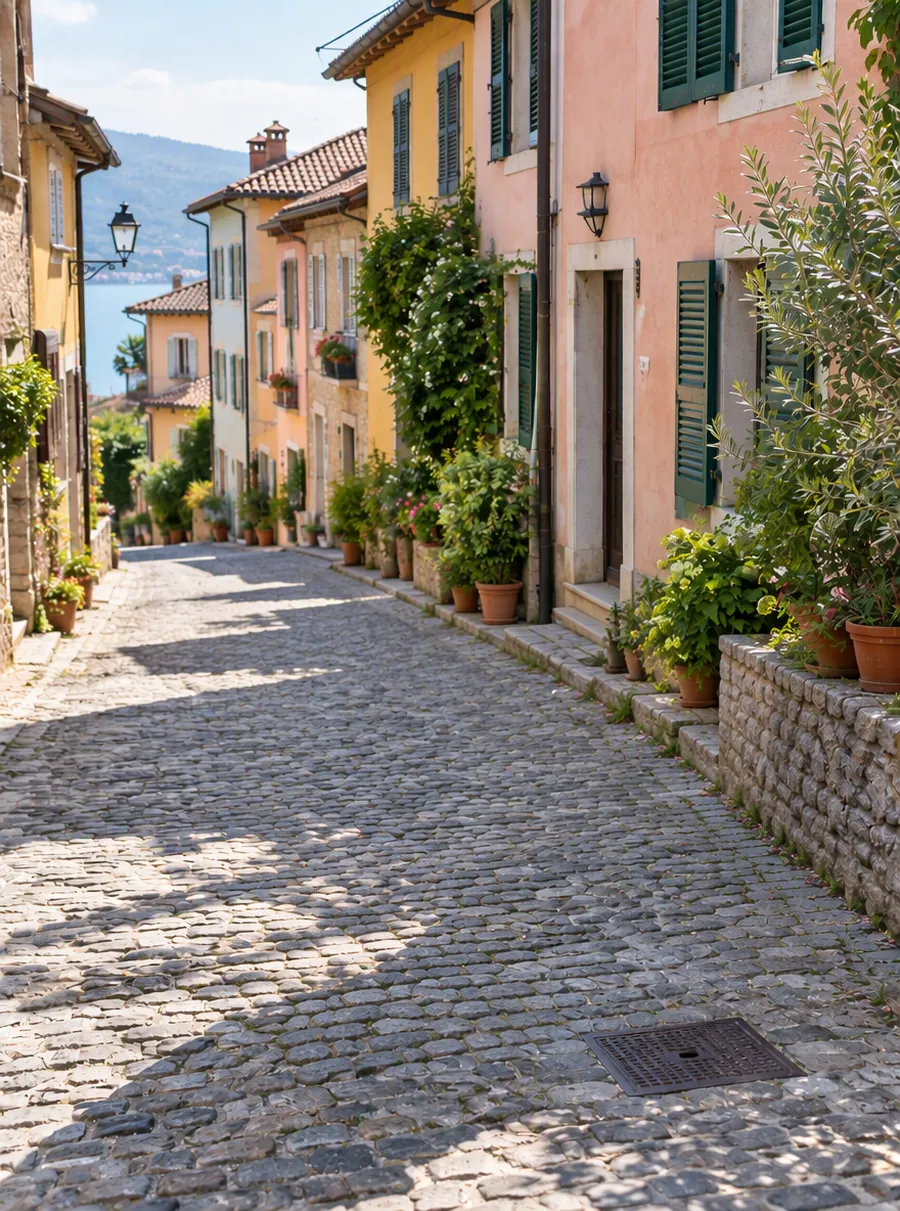
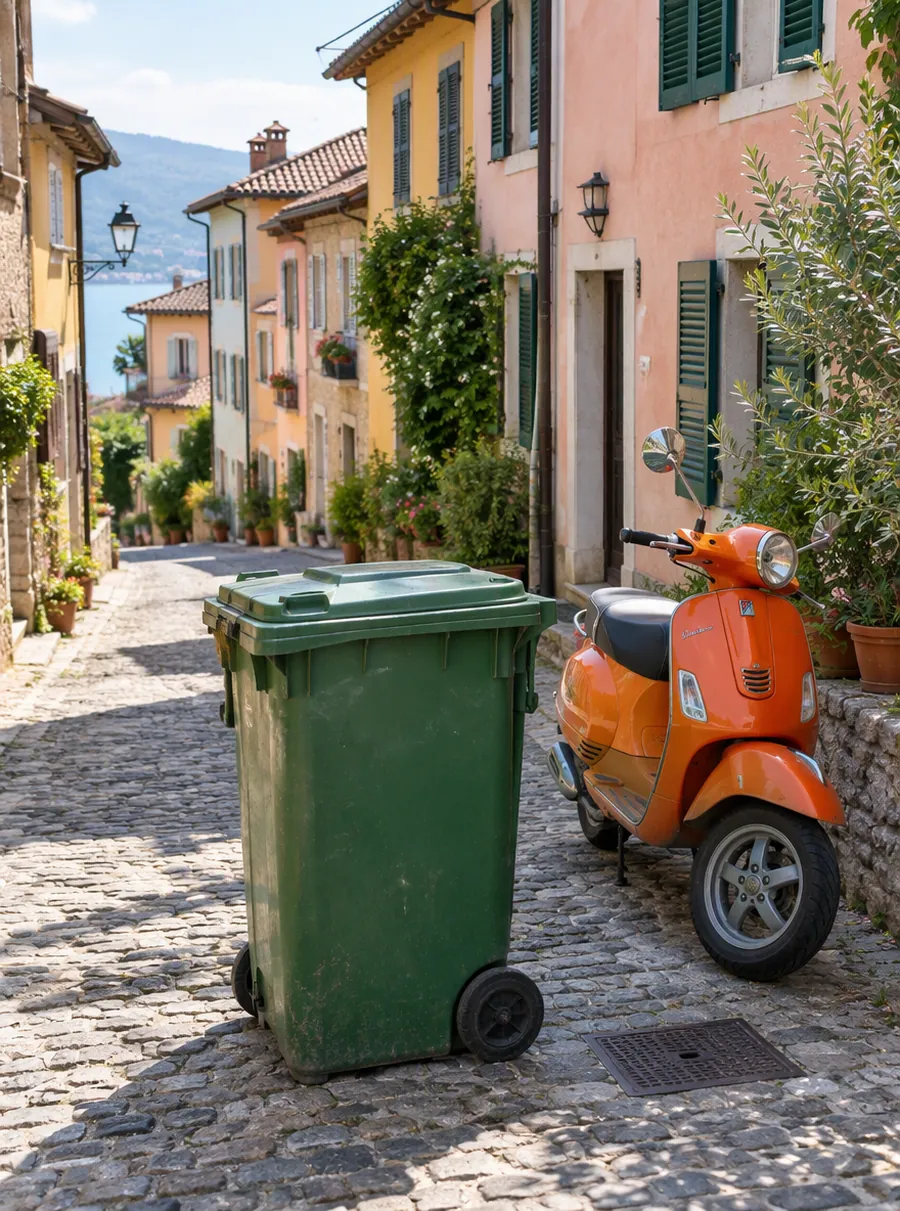
Prompt: “Remove the green trash bin and the orange scooter”
How to remove an object from a photo
Upload the picture
Drop in a JPG, PNG or WebP, or paste one straight from your clipboard with Ctrl+V. Use the largest, sharpest version you have, since a crisp original gives the AI more real detail to borrow when it rebuilds the empty spot.
Say what should disappear
Write one plain sentence that names the object and where it sits. "Remove the power lines across the sky" does far better than "clean this up", because the tool then knows exactly which part of the frame you mean.
Run the edit and look closely
Zoom in on the patched area before you download. Check the edges, any repeating pattern such as bricks or floor tiles, and any shadow the object left behind on the ground.
Edit again if something is left
Press Edit again to treat the result as your new starting photo. That is the simplest way to take out a second item, or to tidy a faint outline the first pass missed.
What the photo eraser handles well: wires, signs, clutter, shadows
Most of what people want gone falls into a handful of groups, and a short prompt covers each of them.
- Wires and poles. Power lines over a skyline, a cable running down a wall, a lamp post that seems to grow out of someone's head.
- Signs and stickers. A parking sign in a landscape, price stickers on a product, a sale board on a front lawn. For words printed on the picture itself, the text remover page goes into more detail.
- Clutter. Trash cans, a stray chair, a hose on the patio, dishes on a counter, cords behind a desk. Shops and landlords post cleanup pictures like these every day.
- Shadows and reflections. Ask for the shadow along with the object, or a dark patch will still show where something stood.
- Small distractions in scenery. Litter on a beach, a fence post cutting through a sunset, a parked scooter in front of a mural.
Whether you call it an image eraser, an image remover, an AI eraser or a magic eraser photo tool, the job is the same: take one thing out and leave a believable background behind. Small objects on plain surroundings are the easy case when you remove object from photo scenes. When something covers a large share of the frame, the AI has to invent what was behind it, and invented detail is a guess. It often looks right, but view it the way a stranger would before you share it.
Describe it well: location, color and what it is
This AI object remover reads words rather than an outline. Instead of painting a selection, you tell it what to take out, and that works best when your sentence would let a friend point straight at the object. Three kinds of detail help most.
- Say where it is. On the left, in the top right corner, behind the bench, on the second shelf, far in the background. Location words separate the cone you want gone from the one you want to keep.
- Say what color it is. "The red car" or "the white plastic bag" picks out one thing even in a busy street scene.
- Say what it is, plainly. Use the everyday name: trash can, traffic cone, extension cord, ladder. Vague words like "that thing" or "the mess" leave the AI guessing.
If two similar objects sit side by side, name the one to remove and the one to keep: "Remove the blue chair on the right, keep the blue chair on the left." One object per sentence is the safest habit. For several items, list them in a single prompt, or handle them one at a time so you can check each fill.
Prompts you can copy
Paste one of these into the prompt box, then swap the details for whatever is in your own photo.
| Prompt | What it does |
|---|---|
| Remove the power lines across the sky | Clears overhead cables from a skyline or landscape |
| Remove the trash can on the left side of the street | Takes out one item, using a location word to find it |
| Remove the red car parked in front of the house | Uses color to pick a single car out of the scene |
| Remove the cords and chargers from the desk | Tidies a workspace shot for a listing or a post |
| Remove the orange traffic cone and its shadow | Erases the object and the dark patch it casts |
| Remove the price sticker from the bottle | Cleans up a product photo before you list it |
Tips for a clean fill
The fastest way to remove things from pictures without a visible patch is mostly about how you set up the request. Anyone who needs to clean up pictures for a listing or a post can use these habits.
- Begin with your best file. Free results come back at 1K, about 1024 px on the long side, so a large original ends up smaller. Paid plans add 2K and 4K output when size matters.
- Mention the shadow or reflection if you want that gone too. The AI treats them as separate from the object unless you say otherwise.
- Describe the replacement for big gaps. "Remove the car and continue the brick driveway" gives the fill a direction instead of leaving it to chance.
- Compare nearby details. The AI aims to leave everything outside the request alone, but it is redrawing part of the image, so glance at faces, text and edges next to the edit.
- Do not worry about failed attempts. If an edit fails, its credits go back to your account automatically.
If the thing in the way is a human, the person remover page has prompts written for crowds and photobombers. And when the whole setting is the problem rather than one item in it, it is quicker to start over with a new setting than to erase it piece by piece, so change the background and start fresh.
FAQ
How to remove something from a picture?
Upload the picture, type a sentence that names the thing and where it is, then run the edit. The AI erases it and fills the space with matching background. If a trace remains, use Edit again on the result. A clear description, such as "the green bin by the door", matters more than anything else you do.
How to edit someone out of a picture?
Describe the person the same way you would an object: their position, the color of their clothes and what they are doing. "Remove the man in the gray hoodie on the right" is a good start. People usually cover more of the frame than stray objects, so look over the filled area carefully before you post it.
Is there a free app to remove unwanted objects from photo?
AI Image Edit runs in a web browser, so there is nothing to install. Guests get 3 free credits a day without an account, a free account gets 5, and a standard removal uses 1 credit. Free results carry no watermark and come out at 1K, so you can remove object from photo online free of charge each day.
Are there apps to remove things from photos free?
Several exist, and most ask you to trace the object with your finger or cursor. This one takes a typed sentence instead, which helps when the object is thin and hard to outline, like a wire or a fence. Daily credits refresh every 24 hours and do not stack up, so there is no reason to save them.
How to erase something from a picture?
Write "remove" plus the object, its color and its place in the frame. Erasing works best on things with plain surroundings, like sky, grass, a wall or a floor, because the AI can extend that texture. On busy backgrounds, add what should appear instead, such as "continue the bookshelf". Check the result at full size before using it.
How to edit people out of photos?
One person per prompt gives the most control. Name each by position and clothing, run the edit, then use Edit again for the next. Groups that overlap, or someone standing right in front of your main subject, may need two passes. Edits can be used commercially, so a cleaned shop or rental photo is fine to publish.
Related tools

Remove Unwanted People from Your Photos
Remove people from photos online: photobombers, tourists or an ex. Tell the AI who to erase and it rebuilds the background behind them. Free daily.

Erase Words and Captions from a Picture
Remove text from an image online. Erase captions, date stamps and labels while AI rebuilds the background behind them. Upload, describe, download.

Change a Photo's Background by Describing the Scene
Change the background of a photo with a text prompt: plain white, a sunset beach or a modern office. AI builds the new scene around your subject.
AI Photo Editor
Upload a photo and type what to change. Remove objects, swap backgrounds, fix blur and restore old photos with an AI image editor online. Free daily edits.
Clear the clutter from your next photo
Upload a picture, name what should go, and download a cleaner version you can use anywhere.